kafka
Overview
Brokers and Clusters
- All producers must connect to the leader in order to publish messages, but consumers may fetch from either the leader or one of the followers. Cluster operations, including partition replication
- Kafka brokers are configured with a default retention setting for topics, either retaining messages for some period of time (e.g., 7 days) or until the partition reaches a certain size in bytes (e.g., 1 GB). Once these limits are reached, messages are expired and deleted. In this way, the retention configuration defines a minimum amount of data available at any time. Individual topics can also be configured with their own retention settings so that messages are stored for only as long as they are useful. For example, a tracking topic might be retained for several days, whereas application metrics might be retained for only a few hours. Topics can also be configured as log compacted, which means that Kafka will retain only the last message produced with a specific key. This can be useful for changelog-type data, where only the last update is interesting.
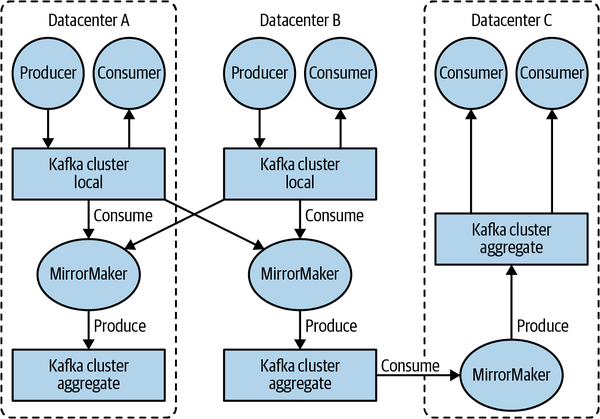
- The replication mechanisms within the Kafka clusters are designed only to work within a single cluster, not between multiple clusters.
- The Kafka project includes a tool called MirrorMaker, used for replicating data to other clusters. At its core, MirrorMaker is simply a Kafka consumer and producer, linked together with a queue. Messages are consumed from one Kafka cluster and produced to another.
Use Cases
- Activity tracking: A website’s users interact with frontend applications, which generate messages regarding actions the user is taking. This can be passive information, such as page views and click tracking, or it can be more complex actions, such as information that a user adds to their profile. The messages are published to one or more topics, which are then consumed by applications on the backend. These applications may be generating reports, feeding machine learning systems, updating search results, or performing other operations that are necessary to provide a rich user experience.
- Messaging
- Metrics and logging: This is a use case in which the ability to have multiple applications producing the same type of message shines. Applications publish metrics on a regular basis to a Kafka topic, and those metrics can be consumed by systems for monitoring and alerting. They can also be used in an offline system like Hadoop to perform longer-term analysis, such as growth projections. Log messages can be published in the same way and can be routed to dedicated log search systems like Elasticsearch or security analysis applications.
- Commit log: Since Kafka is based on the concept of a commit log, database changes can be published to Kafka, and applications can easily monitor this stream to receive live updates as they happen. This changelog stream can also be used for replicating database updates to a remote system, or for consolidating changes from multiple applications into a single database view. Durable retention is useful here for providing a buffer for the changelog, meaning it can be replayed in the event of a failure of the consuming applications. Alternately, log-compacted topics can be used to provide longer retention by only retaining a single change per key.
- Stream processing:
ZooKeeper ensemble
- It is recommended that ensembles contain an odd number of servers (e.g., 3, 5, and so on)
- Consider running ZooKeeper in a five-node ensemble. To make configuration changes to the ensemble, including swapping a node, you will need to reload nodes one at a time. If your ensemble cannot tolerate more than one node being down, doing maintenance work introduces additional risk. It is also not recommended to run more than seven nodes, as performance can start to degrade due to the nature of the consensus protocol.
- For 5 nodes ensemble, you cannot lose 3 nodes in a 5-node ZooKeeper ensemble without losing availability. The minimum number of nodes that a ZooKeeper ensemble must have to maintain availability is quorum. The quorum is the number of nodes that must be up and running for the ensemble to be considered available. The quorum for a 5-node ensemble is 3. This means that if 3 nodes in the ensemble fail, the ensemble will no longer be available.
Simple configuration:
tickTime=2000
dataDir=/var/lib/zookeeper
clientPort=2181
initLimit=20
syncLimit=5

# server.X=hostname:peerPort:leaderPort
# peerPort: The TCP port over which servers in the ensemble communicate with one another.
# leaderPort: The TCP port over which leader election is performed.
server.1=zoo1.example.com:2888:3888
server.2=zoo2.example.com:2888:3888
server.3=zoo3.example.com:2888:3888
- TickTime: the tickTime setting determines how often the servers in the ensemble need to send heartbeats to each other. If the tickTime is too short, then the servers will spend too much time sending heartbeats. If the tickTime is too long, then the servers may not be able to detect if a server has failed.
- InitLimit: is the amount of time to allow followers to connect with a leader.
- SyncLimit value limits how long out-of-sync followers can be with the leader.
Both values are a number of tickTime units, which makes the initTimit 20 × 2,000 ms, or 40 seconds.
Kafka CLI
Some useful CLI ocmmand:
# Create topic:
/usr/local/kafka/bin/kafka-topics.sh --bootstrap-server localhost:9092 --create --replication-factor 1 --partitions 1 --topic test

# Verify Topic:
/usr/local/kafka/bin/kafka-topics.sh --bootstrap-server localhost:9092 --describe --topic test

# Produce messages to a test topic
/usr/local/kafka/bin/kafka-console-producer.sh --bootstrap-server localhost:9092 --topic test

# Consume messages
/usr/local/kafka/bin/kafka-console-consumer.sh --bootstrap-server localhost:9092 --topic test --from-beginning