Hexagonal
title: Hexagonal Architecture tags:
- haxagonal
- architecture
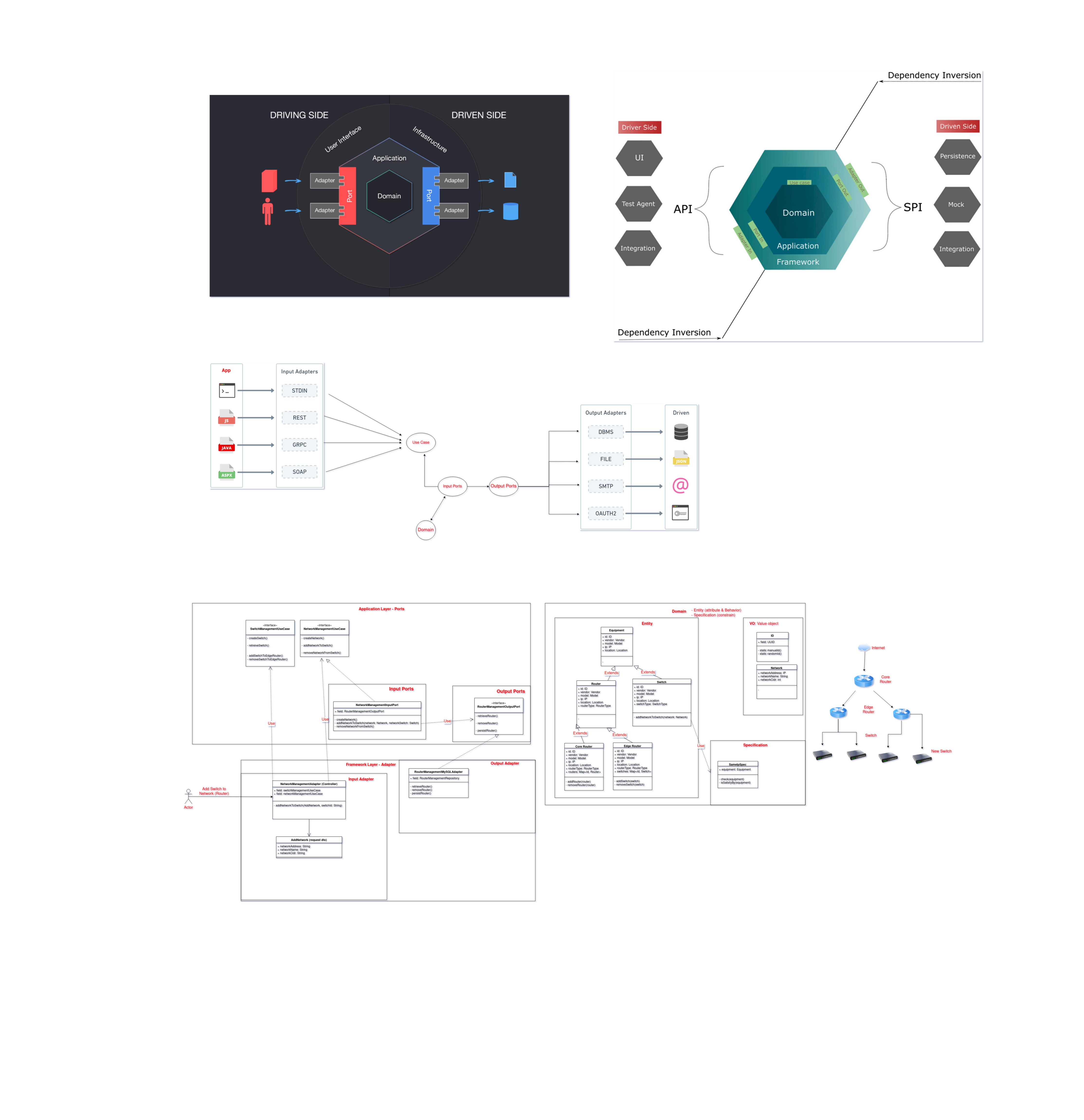
Introduction
The Hexagon architecture is a software design pattern that separates an application into six distinct layers, each with a specific purpose. These layers are:
- User Interface (UI) - handles user interactions and displays information to the user.
- Use Case - contains the business logic of the application.
- Entity - contains the domain objects that represent the data of the application.
- Data Access Object (DAO) - handles the communication with the database or other data storage.
- Repository - acts as an intermediary between the DAO and the Use Case layer.
- Networking - handles communication with external APIs or services.
Here's an example of how the Hexagon architecture might be implemented in a Java application:
- The UI layer is implemented using a JavaFX framework for building a graphical user interface.
- The Use Case layer is implemented as a set of Java classes that contain the business logic of the application.
- The Entities layer is implemented as a set of Java classes that represent the domain objects of the application.
- The DAO layer is implemented as a set of Java classes that handle communication with the database using the JDBC API.
- The Repository layer is implemented as a set of Java classes that act as intermediaries between the DAO and the Use Case layer.
- The Networking layer is implemented as a set of Java classes that handle communication with external APIs or services using the Retrofit library. It's important to note that the Hexagon architecture is just one of many possible ways to structure a software application, and depending on the complexity and the requirements of your project, you may need to use a different approach.
Why Hexagonal Architecture?
- Care about domain
- Don't care about technology as it's adapter -> to achieve Decoupling
Package
- Application
- Domain
- Framework
Framework (Adapter)
- input.rest
- converter
- deserializer
- request (like a dto)
- switch
- CreateSwitch
- router
- AddRouter
- CreateRouter
- network
- AddNetwork
- switch
- RouterManagementAdapter (like a controller)
- Inject RouterManagementUseCase
- @GET retreiveRouter(..)
- output.mysql
- data
- mappers
- repository
Application (Ports)
The Application hexagon is where we abstractly deal with application-specific tasks. I mean abstract because we're not directly dealing with technology concerns yet. This hexagon expresses the software's user intent and features based on the Domain hexagon's business rules.
Ports: interface define to
ports
input If use cases are just interfaces describing what the software does, we still need to implement the use case interface. That's the role of the input port. By being a component that's directly attached to use cases, at the Application level, input ports allow us to implement software intent on domain terms.
- NetworkManagementInputPort (class implement UseCase)
    + Inject RouterManagementOutputPort
    - createNetwork()
    - addNetworkToSwitch()
    - removeNetworkFromSwitch()
output There are situations in which a use case needs to fetch data from external resources to achieve its goals. That's the role of output ports, which are represented as interfaces describing, in a technology-agnostic way, which kind of data a use case or input port would need to get from outside to perform its operations. I say agnostic because output ports don't care if the data comes from a particular relational database technology or a filesystem, for example.
- RouterManagementOutputPort (interface)
    - retrieveRouter()
    - removeRouter()
    - persistRouter()
usecases Use cases represent the system's behavior through application-specific operations, which exist within the software realm to support the domain's constraints. Use cases may interact directly with entities and other use cases, making them flexible components.
- NetworkManagementUseCase (interface)
    - createNetwork()
    - addNetworkToSwitch()
    - removeNetworkFromSwitch()
Domain
The least the dependency, the better.
- entity
- factory
- RouterFactory
- Equipment (abstract class)
- Router (abstract class extend Equipment)
- CoreRouter (extend Router)
- validate spec using Specification
- EdgeRouter (extend Router)
- factory
- exception
- service
- NetworkService (class)
- static filterAndRetrieveNetworks
- static findNetwork
- RouterService (class)
- static filterAndRetrieveRouter
- static findById
- NetworkService (class)
- specification
- vo (value object)
- It contains only value and without identity and it's immutable.
Example
@SpringBootApplication
public class HexagonApplication {
    public static void main(String[] args) {
        SpringApplication.run(HexagonApplication.class, args);
    }
}

@RestController
class NetworkingController {
    private final RestTemplate restTemplate;

    public NetworkingController(RestTemplateBuilder restTemplateBuilder) {
        this.restTemplate = restTemplateBuilder.build();
    }

    @GetMapping("/external-api")
    public String callExternalApi() {
        return restTemplate.getForObject("https://some-external-api.com/data", String.class);
    }
}

@Service
class RepositoryService {
    private final SomeEntityRepository someEntityRepository;

    public RepositoryService(SomeEntityRepository someEntityRepository) {
        this.someEntityRepository = someEntityRepository;
    }

    public List<SomeEntity> getAllSomeEntities() {
        return someEntityRepository.findAll();
    }
}

@Service
class UseCaseService {
    private final RepositoryService repositoryService;
    private final NetworkingController networkingController;

    public UseCaseService(RepositoryService repositoryService, NetworkingController networkingController) {
        this.repositoryService = repositoryService;
        this.networkingController = networkingController;
    }

    public String performBusinessLogic() {
        List<SomeEntity> entities = repositoryService.getAllSomeEntities();
        String dataFromExternalApi = networkingController.callExternalApi();
        // do some processing with entities and data from external api
        return result;
    }
}

@Controller
class UIController {
    private final UseCaseService useCaseService;

    public UIController(UseCaseService useCaseService) {
        this.useCaseService = useCaseService;
    }

    @GetMapping("/")
    public String getResult(Model model) {
        String result = useCaseService.performBusinessLogic();
        model.addAttribute("result", result);
        return "result";
    }
}
In this example, the NetworkingController class handles communication with external APIs or services using the Spring RestTemplate. The RepositoryService class acts as an intermediary between the DAO and the UseCaseService layer.
the UseCaseService class contains the business logic of the application. It uses the RepositoryService to retrieve data from the database and the NetworkingController to communicate with external APIs or services. The UIController class handles user interactions and displays the result of the business logic to the user.
In the example, the SomeEntityRepository is a DAO class that is generated by Spring Data JPA, which uses the JPA EntityManager to communicate with the database.
It's important to note that this is a very basic example, and in a real-world application, you would likely have many more classes and layers, but the basic structure of the Hexagon architecture would remain the same.
Additionally, this example uses Spring Boot to automatically configure and wire all the components together, so you don't have to manually instantiate the classes and configure their dependencies.
You may also want to consider adding security, logging, exception handling and testing for your application.
Also, you should take into account that this is just one possible way to implement Hexagon architecture with Spring Boot, and depending on the complexity and the requirements of your project, you may need to use a different approach.
Reference
- Hexagonal architecture there are always two sides to every story
- https://learning.oreilly.com/library/view/designing-hexagonal-architecture/9781801816489/B17571_01_Final_ASB_ePub.xhtml#_idParaDest-25
- https://github.com/PacktPublishing/Designing-Hexagonal-Architecture-with-Java
- https://gitlab.com/SB.NorinKe/hexagonal-demo